Cash Flow Setup
Cash Flow Setup
Before generating a cashflow projection you need to ensure that all the information is set up correctly. The cashflow will not produce meaningful results unless all the information is set up.
Set up:
You will need to ensure that the following is carried out.
Budgets:
You will need to ensure that a correct budget has been set up and includes sales, purchases and all expenses. To set up the budget either select the ledger account, select Balances and Budgets and select Edit Budgets or use the Budget Wizard
Setting up Ledger Accounts for the Cashflow.
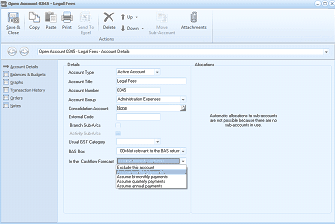
The Open Account dialog for account 60415 - Legal Fees, showing the Account Details tab. The left navigation lists Account Details (selected), Balances & Budgets, Transaction History, Orders, and Attachments. The Details section shows fields for Account Type (Expense Account), Account Title (Legal Fees), Account Number (C045), Account Group (Administration Expenses), Consolidation Account (None), External Code, and Usual BRT Category. A dropdown labeled "In the CashFlow Forecast" is visible with options for selecting the payment interval. An Allocations section notes that "Automatic allocations to sub-accounts are not 100.0000 because there are no allocations to ANY costs in the..." The dropdown shows options including excluding the account and various payment frequency intervals.
You will need to select a ledger account and from the drop down list for the "In the CashFlow Forecast" select the interval when the expense is due to be paid. The intervals are Monthly,Bi-Monthly, Quarterly or Annually. If you select Bi-monthly, Quarterly or Annually then there will be an additional drop down list to choose the period when the payment will first begin. Note: This should be the first month that the payment will occur in the financial year. For example if your telephone account is paid bi-monthly and you pay each February,April,June etc then enter February as the first month. Another example is insurance where in most cases it is paid annual but needs to be spread evenly over the twelve months for budget purposes. In this case enter the budget for each month and then select Annually as the interval and ABM will then accumulate the budget values for the twelve months and place the payment in the appropriate month.
Accounts Not Included
Some expense items have an impact on you budget but not on your cashflow for example depreciation. Where an expense item does not have an impact on the cashflow then select Exclude this Account when selecting "In the CashFlow"
Accounts that should not be included include Stock Movement account and Closing Work In Progress. Whilst these accounts will have an impact on your budget and P&L the cash impact will be taken into consideration in the payments to creditors.
Purchase of Fixed Assets and Other Investments
While purchase of fixed assets or investments will not have an impact on your budget, and will not be included in any comparisons when comparing budget to actual, you should set up a budget for these so that they can be included in the cashflow. Enter the amount in the period you expect the expenditure to occur, and select monthly as the interval. By entering the amount in the particular month you expect the expenditure to occur, the cashflow will place it in the appropriate month. By selecting monthly will allow you to enter more than one expenditure for this account. For example, you maybe purchasing new vehicles but not all at the same time. Therefore, you could for example, enter a budget for March and again for July if required.
**Situations where expenditure is not paid at the same time. **There maybe situations where you budgeted expenditure is not paid all at the same time. For example Wages, you maybe paying out the net wages to employees each month but paying state insurance or pensions at different intervals. As ABM will not be able to determine these different intervals we suggest that you set up a budget for Wages and enter the net amount of wages to be paid. Then set up a budget for Pensions (and set the consolidation account to Wages). In this way you can then enter a different interval for the payment of pensions and have the budget and expenses still consolidated as Wages.