Bank Deposits
Bank Deposits
Bank Deposits
If you have selected Deposit List Required in the Banking section of Options, then all deposits will be grouped together, and available for management through the Bank Deposit program.
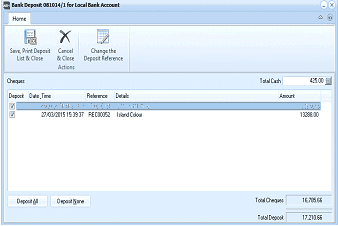
The Bank Deposit dialog box titled "Bank Deposit 081014/1 for Local Bank Account". The toolbar shows buttons for Save Print Deposit List & Close, Cancel & Close Actions, and Change the Deposit Reference. The top of the screen shows Cheques and Total Cash (425.00) columns. A list displays deposit entries with columns for selection checkboxes, Date/Time, Reference, Details, and Amount. One entry is shown dated 27/03/2015 for REC00052 from Island Colour for 13388.00. At the bottom, buttons for Deposit All and Deposit None are shown, along with Total Cheques (16,705.68) and Total Deposit (17,210.68) amounts.
Deposit List.
- List of Cheques: Cheques that have been included in customer receipts will be listed here. The cheques will be marked for inclusion in the deposit. However, if you wish to exclude a cheque from being banked, then unselect the tick. The cheque will then be included in the next deposit run.
- Cash: The cumulative value of cash included in customer receipts will be shown at the top of the screen under Total Cash. If you are banking a lesser amount, then enter this amount and the balance will be written off. A screen will appear showing the difference to write off and requesting you to select a ledger account for the write off, together with a description of the nature of the write off.
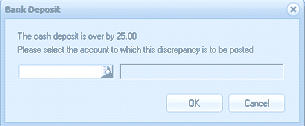
A small Bank Deposit dialog box displaying a warning message: "The cash deposit is over by 25.00. Please select the account to which this discrepancy is to be posted." There is a dropdown field for selecting the account, along with OK and Cancel buttons.
- Deposit All: Will select all cheques for inclusion in the deposit.
- Deposit None: Will remove all cheques for inclusion in the deposit.
- Save, Print Deposit List and Close: Processes the deposit and prints the list. The deposit number will then be incremented. to change the next deposit number of set the deposit number initially select Change Deposit Reference at the top of the screen.
- Cancel and Close: Will abandon any changes to the deposit list and close the program.