Processing Standing Payments
Processing Standing Payments
To process a Recurring Payment: In the main menu bar, select Actions, then Process Recurring Payments.
Alternatively:
-
Select Cashbook in the folders list (left of screen) and a list of sub-categories will appear:
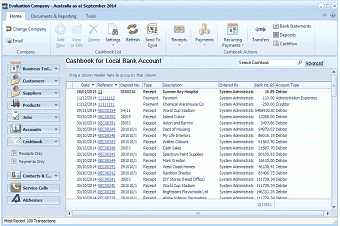 Image Description
The ABM main screen showing the Cashbook for Local Bank Account. The left navigation panel displays folders including Business Info, Customers, Sales Quotes, Delivery & Returns, Suppliers, Products, Accounts, Cashbook (selected), Contacts & C., Service Calls, and Addresses. The main area shows a list of cashbook transactions with columns for Date, Reference, Type, Payee, User, and Account details. The toolbar at top includes buttons for Receipts, Payments, Recurring (highlighted), Transfers, Deposits, and Bank Statements.
List of current Cashbook Receipts and Payments
-
A list of existing payments and receipts appears in the main screen.
-
In the Cash Transactions menu bar (at top of screen) select Recurring Payments and a new Recurring Payments screen appears:
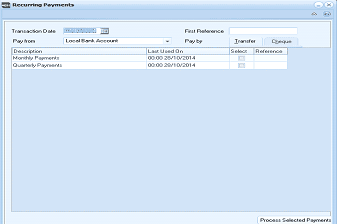 Image Description
The Recurring Payments dialog box. Fields at the top include Transaction Date (with a date picker), First Reference, Pay from (Local Bank Account dropdown), and Pay by options (Transfer and Cheque buttons). The main grid shows columns for Description, Last Used On, Select (checkboxes), and Reference. Two recurring payment entries are listed: "Monthly Payments" (last used 00:00 20/10/2014) and "Quarterly Payments" (last used 00:00 20/10/2014). A "Process Selected Payments" button is at the bottom right.
Recurring Payments
-
Transaction Date: Enter the date that is to appear on the payments. Press F3 or click the calendar button to check the date.
-
First Reference: Enter the reference that you want to give this payment.
-
Pay from: Select from the drop-down list the most frequently used bank account for this transaction.
To set up a default (most frequently used) bank account:
-
Pay by: Select the method of payment for this transaction. In the grid, select the payment that you want to process, then Process Selected Payments.
When you have finished, select 'Close' to return to the main screen.