Introduction to Cash Book Transactions
Introduction to Cash Book Transactions
Cashbook
To process cashbook transactions select Cashbook in the navigation bar. This will list all cashbook transactions posted in the previous 30 days. You can select Payments only, or Receipts only, if required.
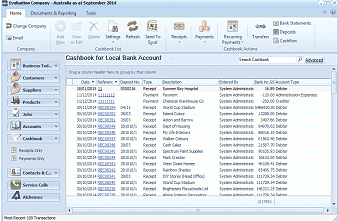
The ABM main screen showing the Cashbook for Local Bank Account. The left navigation panel displays folders including Business Info, Customers, Sales Quotes, Delivery & Returns, Suppliers, Products, Accounts, Cashbook (selected), Contacts & C., Service Calls, and Addresses. The main area shows a list of cashbook transactions with columns for Date, Reference, Type (Payment/Receipt), Payee, User, and Account details. The toolbar at top includes buttons for Receipts, Payments, Recurring, Transfers, Deposits, and Bank Statements. A search bar labeled "Search Cashbook" with an Advanced option is visible.
Cashbook listing.
Cashbook Transactions Menu Bar The Cash Book Transactions menu bar consists of:
-
Receipts (see below)
-
Payments (see below)
-
Receipts and Payments Cash Book Transactions consist of two types of Receipts and Payments.
-
To generate a continuous receipt against customers, suppliers (refund), ledger and jobs, see Generating a Cash Receipt.
-
To generate a continuous payment against customers (refund), suppliers, ledger and jobs, see Generating a Cash Payment.
-
To generate a once off receipt for a selected customer in the Customers section, see Generating a Sales Receipt.
-
To generate a once off payment for a selected supplier in the Suppliers section, see Generating a Purchase Payment.
Note: When viewing cashbook transactions, open the receipt or payment, and you can add a note against the transaction.