Budget Wizard
Budget Wizard
The Budget Wizard exports your chart of accounts, balances and any existing budgets to Excel, where you can make whatever changes are required, then import the results back into your accounts.
To generate the Budget Wizard:
-
Select Accounts from the Folders list, and a list of sub-categories and any existing accounts will appear.
-
In the Ledger Transactions menu bar, select **Budget Wizard **and the following screen will appear:
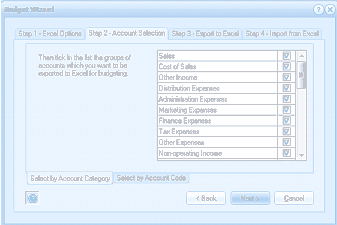
The "Budget Wizard" dialog showing "Step 2 - Account Selection" tab (one of four tabs: Step 1 - Excel Options, Step 2 - Account Selection, Step 3 - Export to Excel, Step 4 - Import from Excel). The screen displays a list of account group categories with checkboxes to select which groups of accounts to export to Excel for budgeting. The categories include: Sales, Cost of Sales, Other Income, Distribution Expenses, Administration Expenses (checked), Marketing Expenses (checked), Finance Expenses (checked), Tax Expenses, Other Expenses, and Non-operating Income. At the bottom are buttons for "Select by Account Category" and "Select by Account Code", along with navigation buttons: Back, Next, and Cancel.
Account Selection section of Budget Wizard
The Budget Wizard contains the following sections, all of which will be discussed below: