Generating the Cash Flow Projection
Generating the Cash Flow Projection
To Run the cashflow projection select the Cash Book list on the left hand side of the screen and select CashFlow. Note: The cashflow will be generated for a twelve month period commencing with the current reporting period. Therefore if the current reporting period is September the cashflow projection will show all months from September to the following August.
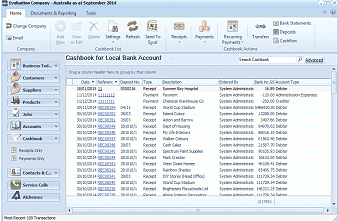
The ABM main screen showing the Cashbook for Local Bank Account. The left navigation panel displays folders including Business Info, Customers, Sales Quotes, Delivery & Returns, Suppliers, Products, Accounts, Cashbook (selected), Contacts & C., Service Calls, and Addresses. The main area shows a list of cashbook transactions with columns for Date, Reference, Type (Payment/Receipt), Payee, User, and Account details. The toolbar at top includes buttons for Receipts, Payments, Recurring, Transfers, Deposits, and Bank Statements.
The following screen will appear.
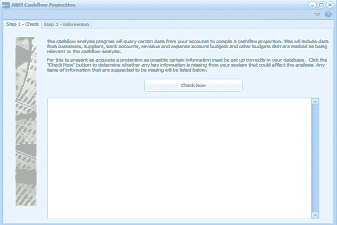
The ABM CashFlow Projection wizard showing Step 1 - Check and Step 2 - Information tabs at the top. The current view is Step 1 with explanatory text describing that the cashflow analysis program will query certain data from accounts to compile a cashflow projection, including data from customers, suppliers, bank accounts, revenue and expense account budgets. It advises that certain information must be set up correctly for accurate projections and provides a "Check Now" button to check for missing information. Below is an empty area where check results will be listed.
The first screen allows you to check the status of the accounts which form the basis of the cashflow projection. This will check the various control accounts such as debtors and creditors to ensure they are set up correctly. It will also check accounts that have been specified to be included in the cashflow to ensures budgets have been set up for these accounts. When the check is completed select Next to move to the next screen average number
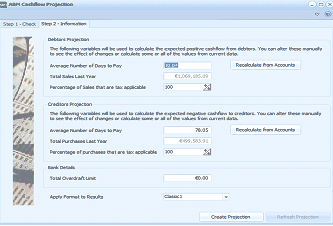
The ABM CashFlow Projection wizard Step 2 - Information screen. The screen is divided into two main sections. The "Debtors Projection" section shows fields for Average Number of Days to Pay (with a calculated value and a "Recalculate from Accounts" button), Total Sales Last Year, and Percentage of Sales that are tax applicable (100%). The "Creditors Projection" section shows similar fields: Average Number of Days to Pay (78.65), Total Purchases Last Year, and Percentage of Purchases that are tax applicable (100%). Below these are Bank Details with a Total Overdraft Limit field (40.00) and an "Apply Format to Results" dropdown set to "Classic 1". At the bottom are "Create Projection" and "Refresh Projection" buttons.
This screen will show information that will be used in the calculation of the cashflow.
Debtor Days:
ABM will calculate the average number of days that debtors have availed of credit over the past year. This works out an average amount of time that the debtor took to pay an invoice from the time it was generated. Note: This average is calculated based on the current debtor balance and the sales over the previous twelve months. It does not take into consideration any seasonal trends which may effect this calculation. Whilst the debtors days is calculated by ABM you can change this value if it is felt that debtors balance could be collected quicker. See Basis Of Calculations below.
Total Sales for Last Year:
This is the value of sales for the previous twelve months. This value cannot be changed manually.
Percentage Of Sales that are Taxable.
Since tax will be collected on future sales, and therefore will have an impact on what cash is received, you will need to enter the percentage of sales that are taxable. The tax will be calculated at the default tax rate in ABM. The tax will be included as part of you source of income and also included as an outgoing in your application of funds based on the tax interval that has been set up.
Creditor Days:
ABM will calculate the average number of days that you have taken to pay creditors over the past year. This works out an average amount of time that you took to pay an invoice from the time it was generated. Note: This average is calculated based on the current creditor balance and the purchases over the previous twelve months. It does not take into consideration any seasonal trends which may effect this calculation. Whilst the creditor days is calculated by ABM you can change this value if it is felt that you could extend the number of days to pay you creditors. See Basis Of Calculations below.
Total Purchases for Last Year:
This is the value of purchases for the previous twelve months. This value cannot be changed manually.
Percentage Of Purchases that are Taxable.
Since tax will be paid on future purchases, and therefore will have an impact on what cash is paid out, you will need to enter the percentage of purchases that are taxable. The tax will be calculated at the default tax rate in ABM. The tax will be included as part of you application of funds, and also included as a deduction from tax generated form sales, which will appear as an outgoing in your application of funds based on the tax interval that has been set up.
Bank Overdraft
If you have an overdraft limit you can enter the amount here. ABM will then show this value for each month so that you can evaluate if you are reaching or exceeding your overdraft.
Apply Format to Results
From the drop down list you can select the format style for your output.
Generate Cashflow
When you are satisfied that all the information entered is correct, you can select Create Projection. This will then produce a spreadsheet showing your projected source and application of funds, together with the net cashflow movement, and the calculated bank balances. The spreadsheet can be modified manually, or you can enter different criteria, such as debtor or creditor days, or the percentage of sales and purchases that are taxable. If you change these values you can then generate the cashflow again and compare the different projections.
Basis of Calculation
Source of Funds:
Source of funds from two sources which are, receipts from debtors and other income. Receipts from debtors will be calculated taking the projected sales plus tax (based on the percentage entered) together with the difference between the opening and closing projected debtor balance for each month. The closing debtor balance will be calculated using the projected sales for the period (together with a proportion of sales from the previous year to calculate a years value of sales) and taking into consideration the average number of debtor days. Other income such as investment income (if included in your budget and the account has an account group of other income of non-operating income) will be included separately.
Application of Funds
Application of funds will be calculated based on payments to creditors together with expense payments as listed in the various ledger accounts and according to the interval set. Payments for assets acquired will be included if a a value has been included in the budget for such an assets account. Payments to creditors will be calculated taking the projected purchases plus tax (based on the percentage entered) together with the difference between the opening and closing projected creditor balance for each month. The closing creditor balance will be calculated using the projected purchases for the period (together with a proportion of purchases from the previous year to calculate a years value of purchases) and taking into consideration the average number of creditor days.
Net Cashflow
This will be the difference between the source of funds(receipts) and application of funds (payments).
Balance at Bank
Both the opening and closing balance at bank will take all bank accounts into consideration, and combine them as one value.
Debtors and Creditors Balance:
The amounts used for the opening balances for the projection will be the debtors and creditors balance as at the end of the previous period. Therefore, if you generate a cashflow for September the opening balance for debtors will be the balance computed as at the end of August.
**Disclaimer: **The cashflow projection should be used as a basis of improving your cash management, and should not be used for external negotiations, since the projections are based on variables which may change, and is dependent on having accurate budgets.