Product Accounts - Financial
Product Accounts - Financial
Financial Details
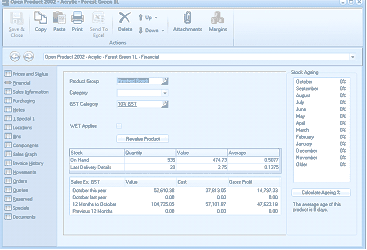
The Financial tab of the "Open Product 20992 - Acrylic - Forest Green 1L" screen in ABM. The toolbar shows Save & Close, Copy, Paste, Print, Send To, Delete, Browse, Attachments, and Margins buttons. The left navigation panel lists tabs: Prices and Status, Financial (currently selected), Sales Information, Purchasing, Locations, Warehouse Bins (Bins), Components, Sales Graph, Invoice History, Movements, Orders, Quotes, Specials, Serial/Lot Numbers, Notes, and Documents. The main area shows fields for: Product Group, Category, GST Category (showing 100% GST), WET Applies checkbox, and a "Revalue Product" button. A "Stock Ageing" panel on the right lists months from January through December. Below is a Stock table showing columns for Stock, Quantity, Value, and Average, with rows for "On Hand" and "Last Delivery Details". At the bottom are sales statistics showing Sales Ex. GST, Value, Cost, and Gross Profit for periods: Current Month, Same Month Last Year, 12 Months Year to Date, and Previous 12 Months, along with a "Calculate Ageing %" button.
Financial section of Add New Product
-
Product Group: Select a product group to help classify your product by clicking Find, or create your own product group by then clicking New.
-
Category: Enter a reference to be used for additional sorting or reporting of up to 10 characters.
-
Tax Category: Click the Find option to select the appropriate tax rate for the product.
-
Revalue Product: If your stock is set up for average costing with that average cost applying to that product for all locations, then you can set a new average cost if required, for this product. When you select the Revalue Product button you will be asked for a Reason for Revaluation, and also for the new average cost. Note: This revaluation is not available where the product costing method is Average Cost by Location, Standard or FIFO.
-
EU Country of Origin (Ireland and UK only): Required for Intrastat reporting.
-
EU Commodity Code (Ireland and UK only): Required for Intrastat reporting.
Product Sales Statistics
The bottom of the screen will display the value for sales, cost of sales and gross profit for the current month, this month last year, year to date and year to date last year.
Structured Stock To set-up products to use Sub-Products see Structured Stock