Product Accounts - Invoice History
Product Accounts - Invoice History
This section shows the invoice history for the item of interest. It gives details of quantities ordered from and delivered to various suppliers and customers. It can be configured to show all invoices, those related to sales, and/or those related to purchases, by clicking on the radio buttons at the bottom of the screen. Select a company name from the list and click 'View Transaction Details' to view an invoice in more detail and export the transaction to Excel for further analysis, add a new note against the transaction, and preview print or e-mail the transaction.
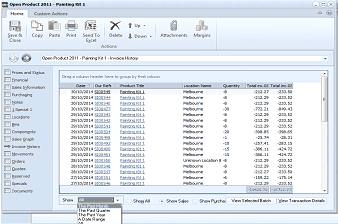
The Invoice History tab of the "Open Product 2011 - Painting Kit 1" screen in ABM. The toolbar includes Save & Close, Copy, Paste, Print, Send To Excel, Delete, Browse, Attachments, and Margins buttons. The left navigation panel shows various tabs with "Invoice History" selected. The main area displays a data grid with columns: Date, Our Reference, Supplier/Customer name, Painting Kit 1 (product), Location (mostly Melbourne), Quantity, Cost, and other financial columns. The grid contains multiple rows of invoice transactions with dates, reference numbers, and associated companies. At the bottom are filter radio buttons: Show All, Show Sales, Show Purchases, along with "View Selected Batch" and "View Transaction Details" buttons.
Invoice History of Acrylic - Emerald Green 1L
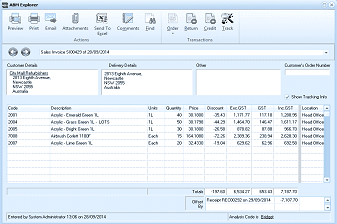
The ABM Explorer window showing a Sales Invoice (S00429) dated 26/09/2014. The toolbar includes Preview, Print, Email, Attachments, Send To, Components, Edit, Delete, Deliver, Check, and Return buttons. The screen has tabs for Customer Details, Delivery Details, Other, and Customer's Order Number. The Customer Details section shows company information including address fields (NSW 2099, Australia). A "Show Tracking Info" checkbox is visible. The main grid displays invoice line items with columns: Code, Description, Units, Quantity, Price, Discount, Exc GST, GST, Inc GST, and Location. Four product lines are shown for various Acrylic products (Cream/Green, Gran Green, Eagle Green, Lime Green) with quantities, prices, and GST calculations. The totals row shows the sum. At the bottom, a status bar shows "Entered by System Administrator" with a Finance PE reference and Analysis Code fields.
Transaction Details
- View Selected Batch: You can view all the postings in a selected batch by selecting "View Selected Batch". A column chooser is available so that you can select the columns you wish to see on the batch details. you can also print the selected batch by selecting the Print Batch List button on the Ribbon or Send the details to Excel by selecting the Send to Excel.
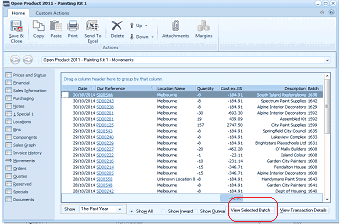
The "Open Product 2011 - Painting Kit 1 - Movements" screen in ABM. The toolbar shows Save & Close, Copy, Paste, Print, Send To, Delete, Browse, Attachments, and Margins buttons. The left navigation panel shows various product account tabs with a movements-related view selected. The main area displays a sortable data grid with columns: Date, Our Reference, Location Name, Quantity, Cost Inc GST, Description, and Set. Multiple transaction rows are listed showing dates, Melbourne locations, quantities (positive and negative values), costs, and company names like Spectrum Paint Supplies, Alpine Interior Decorators, etc. At the bottom are filter buttons: Show All, Show Inward, Show Outward, along with "View Selected Batch" and "View Transaction Details" buttons highlighted with a red circle.
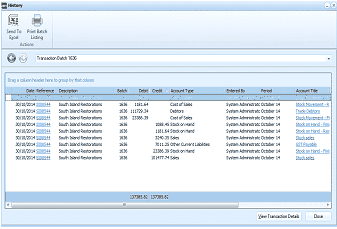
The "History" window showing Transaction Batch details. The toolbar includes "Send To Excel" and "Print Batch Listing" buttons under Actions. The header shows "Transaction Batch 1636". The data grid displays columns: Date, Reference, Description, Batch, Debit, Credit, Account Type, Entered By, Period, and Account Title. Multiple transaction rows are listed showing entries dated 01/10/2014 with descriptions like "South Island Restorations" and various account types including "Cost of Sales", "Stock on Hand", "Other Current Liabilities". The Batch column shows values like 1636. The Entered By column shows "System Administrator October 14". Debit and Credit amounts are displayed for each entry. At the bottom, totals are shown, and a "View Transaction Details" button appears.
Batch Details.