Customer Email Alert
Customer Email Alert
You can set up an E-mail alert so that an e-mail message is sent to the Account Manager, Credit Controller or any other person responsible for deciding on the customers credit status. The e-mail alert can be sent when an order is placed and this order causes the customers credit limit to be exceeded, or their credit terms have already been exceeded.
Setting up E-mail Alert
Select the Customer account and select E-mail Alert.
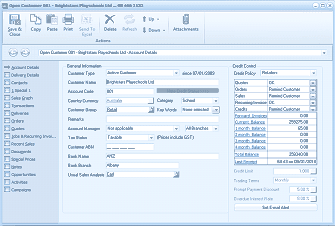
The customer account window showing the Account Details tab for an existing customer. The left sidebar shows navigation tabs. The main area displays General Information fields including Customer Type (set to "Active Customer"), Customer Name (showing "Brightstars Playgrounds Ltd"), Account Code (showing "BOV"), Country Currency, Customer Group (set to "Category" and "Wholesale"), Remarks, Account Manager, Tax Status, Customer ABN, Bank Name (showing "ANZ"), Bank Branch, and Usual Sales Analysis (set to "Cat"). On the right side is the Credit Control section showing Credit Policy, and various status checkboxes. At the bottom right, the "Set E-mail Alert" button is visible, along with Trading Terms, Prompt Payment Discount, and Overdue Interest Rate fields.
This will open the settings screen as follows:
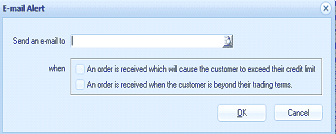
The "E-mail Alert" dialog box. It contains a "Send an e-mail to" field with a text input and a finder button to select a contact. Below is a "when" section with two checkboxes: "An order is received which will cause the customer to exceed their credit limit" and "An order is received when the customer is beyond their trading terms." Both checkboxes can be selected independently. The dialog has "OK" and "Cancel" buttons at the bottom right.
Send an e-mail to: Enter the recipients e-mail address. You can either enter this address manually or select the Finder button (F3) to select from your list of contacts.
When do you want the e-mail sent.
You can select the event which will trigger an e-mail to be sent to the nominated recipient when
- An order is received which will cause the customer to exceed their credit limit
- An order is received when the customer is beyond their trading terms
Note: both of the above options can be selected.