Job Record - Transactions
Job Record - Transactions
All the information on all transactions is shown here, and can be ordered by date, reference numbers, description, and so on.
Any given transaction can be examined in more detail by clicking on the 'View Transaction Details' option. The 'View Transaction Details' screen that appears also gives the customer and delivery details and allows you to export the transaction to Excel for further analysis, add a new note against the transaction, and preview print or e-mail the transaction.
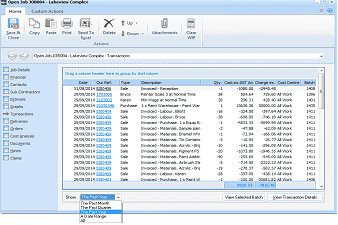
The "Open Job" dialog window is displayed showing the "Transactions" tab for the "Lakeview Complex" job. The left side shows navigation tabs with Transactions currently selected. The main area displays a data grid listing all transactions for the job, with columns for Date, Ref, Type (showing entries like Sale, Payment, etc.), Description, Qty, Cost ex GST, Act Charges, and Cost Centre. Multiple transaction rows are visible showing various sales, purchases, labour charges, and material costs dated throughout 2014. At the bottom of the grid are "Show" dropdown filters for time period (showing "The Past Month" and "All Charges" options), and buttons for "View Selected Batch" and "View Transaction Details". The toolbar at the top includes Save & Close, Copy, Paste, Print, Send To, Delete, and Down buttons, as well as Attachments and WIP options.
You can use the Column Chooser to add or remove columns to display the information you require. By selecting View Transaction Details, or selecting the blue hyper link you can view the details on any transaction line.
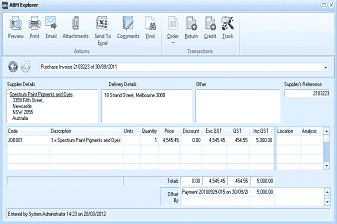
The "ABM Explorer" window is displayed showing a purchase invoice transaction detail view. The title shows "Purchase Invoice 2/15322 at 30/09/2011". The window has a toolbar with tabs including Preview, Print, Email, Attachments, Send To, Comments, Email, Order, Deliver, Returns, Invoice, Credit, and Jack. Below the toolbar are sections for Supplier Details (showing "Spectrum Paint Pigments and Dyes" with a street address in Melbourne 3008), Delivery Details, and Other information, plus a "Supplier's Reference" field showing a reference number. The main grid area shows a single line item with Code JOB001, Description "1 x Spectrum Paint Pigments and Dyes", with quantity, price, and GST details. Below the grid are totals and a "Payment" line. The footer shows "Entered by System Administrator 14:21 on 20/03/2012" and "Pay" checkbox.
Transaction Details
View Selected Batch: You can view all the postings in a selected batch by selecting "View Selected Batch". A column chooser is available so that you can select the columns you wish to see on the batch details. You can also print the selected batch by selecting the Print Batch List button on the Ribbon or Send the details to Excel by selecting the Send to Excel.
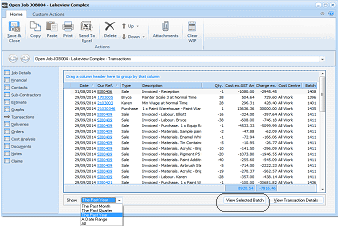
The "Open Job" dialog window is displayed showing the "Transactions" tab for the "Lakeview Complex" job, similar to the earlier transactions view. The data grid shows multiple transaction rows with columns for Date, Ref, Type, Description, Qty, Cost ex GST, Act Charges, and Cost Centre. One transaction row is highlighted/selected in the grid. At the bottom of the grid are "Show" dropdown filters and buttons for "View Selected Batch" and "View Transaction Details", with "View Selected Batch" being the highlighted action option.
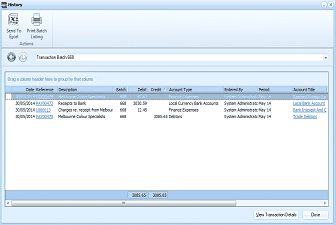
The "History" window is displayed showing batch transaction details. The title shows "Transaction Batch 688". The window has a toolbar with buttons for Send To Excel, Print Batch Listing, and other options under an "Actions" section. A breadcrumb shows "Transaction Batch 688". Below is a note "Drag a column header here to group by that column". The data grid displays batch transaction details with columns for Date, Reference, Description, Batch, Debit, Credit, Account Type, Entered By, and Account Title. Three transaction rows are visible dated 30/05/2014, showing entries including "Receipts to Banks" for a Local Currency Bank Account, "Charges for receipt from McKay" for Prepaid Expenses, and "Melbourne Colour Specialists" for an account, all in batch 688 with corresponding debit and credit amounts. At the bottom are totals showing balanced debit and credit amounts (3885.45 each) and buttons for "View Transaction Details" and "Close".
Batch Details.