Job Record - Deliveries
Job Record - Deliveries
All the information on deliveries to the selected job is shown here. This information can be ordered by date, reference number, description, and so on. It also provides information on the costs breakdown of each transaction.
Any given delivery can be examined in more detail by clicking the 'View Transaction Details' button. The 'View Transaction Details' screen that appears also gives the customer and transaction details and allows you to export the transaction to Excel for further analysis, add a new note against the transaction, and preview print or e-mail the transaction.
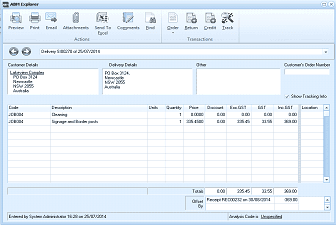
The "ABM Explorer" window is displayed showing a delivery transaction detail view. The title shows "Delivery S/80218 at 25/07/2014". The window has a toolbar with tabs including Preview, Print, Email, Attachments, Send To, Comments, Email, Order, Deliver, Returns, Invoice, Credit, and Jack, plus a Transactions tab. Below the toolbar are sections for Customer Details (showing "Lakeview Complex" address with location details), Delivery Details (showing a PO Box address), and Other information, plus a "Customer's Order Number" field. A checkbox for "Show Tracking No" is visible. The main grid area shows line items with columns for Code, Description, Units, Quantity, Price, Discount, Exc GST, GST, Inc GST, and Location. Two line items are visible: JOB004 (Doorstop) and JOB001 (Signpost and Border posts) with their respective quantities and pricing. Below the grid are totals and a "Parcel RE number" field. The footer shows "Entered by System Administrator 15:26 on 25/07/2014" and "Analysis Code" with an "Unspecified" option.
Transaction Details