Job Record - Graphs
Job Record - Graphs
ABM calculates and posts costs and charges so you can compare your actual costs to your estimates. The Graphs tab compares your actual costs to your estimates in graphical form. Choose from the drop-down arrows at the bottom of the screen to view:
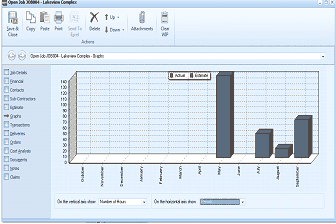
The "Open Job" dialog window is displayed showing the "Graphs" tab for the "Lakeview Complex" job. The left side shows navigation tabs for Job Details, Financial, Sub-Contractors, Estimate, Graphs (currently selected), Transactions, Deliveries, Orders, Cost Analysis, Notes, and Documents. The main area displays a bar chart comparing "Actual" (dark bars) and "Estimate" (lighter bars) values. The chart shows several categories along the horizontal axis with corresponding monetary values on the vertical axis ranging from 0 to 160. At the bottom of the chart are dropdown selectors: "On the vertical axis show" set to "Number of hours" and "On the horizontal axis show" with another dropdown. The chart provides a visual comparison of actual costs versus estimated costs for the job.