Job Record - Orders
Job Record - Orders
All the information on all orders is shown here, and can be arranged by date, reference numbers, and so on. By clicking the appropriate radio button, the information can be configured to show either sales orders or purchase orders.
-
Track Order: Shows all Deliveries, Returns, Invoices, and Credits relating to this order.
-
View Order: Click here to send to order to Excel for further analysis, add a new note against the transaction, and preview print or e-mail the transaction.
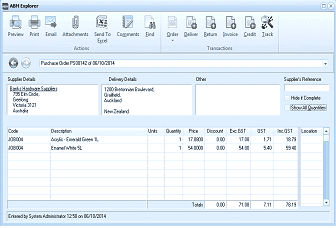
The "ABM Explorer" window is displayed showing a purchase order detail view. The title shows "Purchase Order PS30142 at 06/10/2014". The window has a toolbar with tabs including Preview, Print, Email, Attachments, Send To, Comments, Email, Order, Deliver, Returns, Invoice, Credit, and Jack, plus a Transactions tab. Below the toolbar are sections for Supplier Details (showing "Earth Hardware Supplies" with a street address and city including "Auckland, New Zealand"), Delivery Details (showing "1200 Battersea Boulevard, Oakleigh" and additional address lines), Other information, and a "Supplier's Reference" field. An "Order is Complete" checkbox and "Show All Quantities" option are visible. The main grid area shows line items with columns for Code, Description, Units, Quantity, Price, Discount, Exc GST, GST, Est, and Location. Two line items are listed: JOB006 (Audio-Visual Games S) and JOB004 (Enamel White SL). Below the grid are totals. The footer shows "Entered by System Administrator 12:56 on 06/10/2014".
Transaction Details