Supplier Accounts - Product List
Supplier Accounts - Product List
You can view products where the supplier is the preferred supplier for those product or where products are bought occasionally from the supplier. To view this list select the supplier maintenance screen and select Product List.
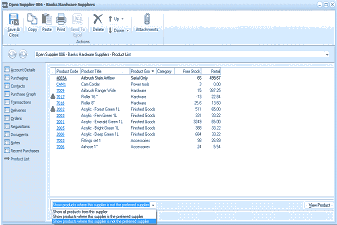
The supplier account window showing the Product List tab. The left sidebar shows navigation tabs with Product List selected. The main area displays a grid of products associated with this supplier, with columns for Product Code, Product Title, Product Type, Category, Fore Words (forecast), and additional columns. Multiple product rows are listed showing various products such as hardware items with their codes, titles, product types (e.g., "Finished Goods", "Inventory"), and categories. At the bottom are filter options showing "Show all products from this supplier" dropdown, and a "View Product" button on the right. A note at the bottom indicates options to show products where the supplier is or is not the preferred supplier.
Options Available: There are three options available from the drop down list.
- Show All Products from This Supplier: This will display all products purchased at any time from this supplier or where a supplier price from this supplier has been recorded against the product.
- Show Products where the Supplier is the Preferred Supplier: This will display the products where this supplier is the preferred supplier for the product.
- Show Products where the Supplier is Not the Preferred Supplier: This will display the products where this supplier has not been set as the preferred supplier for the product.