Recently Run Reports
Recently Run Reports
When you run a report it will be included in the list of Recently Run Reports so that if you wish to re-run a report again you can select that report, and select Produce Report.
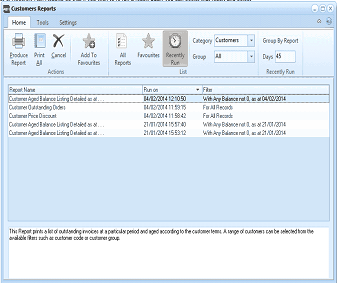
The Customers Reports screen showing the Recently Run view. The toolbar ribbon includes buttons for Produce Report, Print All, Cancel, Add To Favourites, All Reports, Favourites, Recently Run, with Category set to Customers, Group By Report toggle, and Days set to 45. The report list shows columns for Report Name, Run on (date/time), and Filter, displaying recently run reports such as Customer Aged Balance Listing Detailed as at, Customer Outstanding Orders, Customer Price Discount, Customer Aged Balance Listing Detailed as at, and Customer Aged Balance Listing Detailed as at, with their respective run dates and filter parameters like "With Any Balance not 0, as at" dates. A description area at the bottom explains: "This Report prints a list of outstanding invoices at a particular period and aged according to the customer terms. A range of customers can be selected from the available filters such as customer code or customer group."
History of Recently Run Reports
If you run the report again, it will run with the same parameters that you selected when running the report initially, therefore, you do not need to re-select those parameters again.
Number of days to hold the history: You can enter the number of days you wish to hold the history of such recently run reports by inserting the number of days shown on the right hand side of the screen.
Group By Report
If you select the button Group by Report, then it wil group all the same type of reports that you have recently run. This will make it easier for you the select the required report you wish to run.
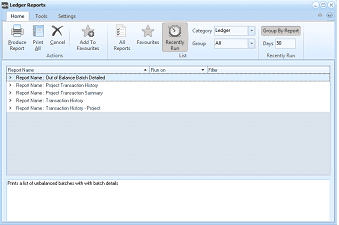
The Ledger Reports screen showing the Recently Run view with Group By Report enabled. The toolbar ribbon includes buttons for Produce Report, Print All, Cancel, Add To Favourites, All Reports, Favourites, Recently Run, with Category set to Ledger, Group By Report button highlighted, and Days set to 36. The report list shows columns for Report Name, Run on, and Filter. Reports are grouped by report name, showing entries like "Report Name: Out of Balance Batch Detailed", "Report Name: Project Transaction History", "Report Name: Project Transaction Summary", "Report Name: Transaction History", and "Report Name: Transaction History - Project". A description area at the bottom reads: "Prints a list of unbalanced batches with each batch details."