Adding a Logo to the reports
Adding a Logo to the reports
You can add your own logo to your reports. Note: you can add a different logo for each company you operate if you require.
To add a logo select Tools and select Options and select the Company tab. You can then browse for your required logo.
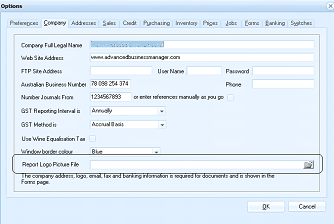
Image Description
The Options dialog box with the Company tab selected. Visible fields include Company Full Legal Name, Web Site Address, FTP Site Address (with Use Name and Password fields), Australian Business Number, Number Journals From, GST Reporting Interval (set to Annually), GST Method (set to Accrual/Full), Use Wine Equalisation Tax checkbox, Window border colour (set to Blue), and a Report Logo Picture File field at the bottom with a browse button. The dialog has OK and Cancel buttons at the bottom right.