Ledger Account - Balances and Budgets
Ledger Account - Balances and Budgets
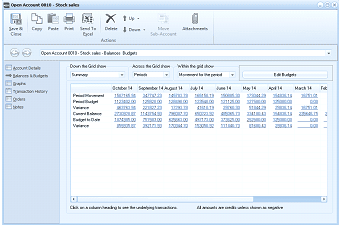
The "Open Account 0810 - Stock sales" screen showing the "Balances & Budgets" tab. The left navigation panel lists tabs: Account Details, Balances & Budgets (currently selected), Graphs, Transaction History, Orders, and Notes. At the top are dropdown controls for "Down the Grid show" (set to "Summary"), "Across the Grid show" (set to "Periods"), and "Within the grid show" (set to "Movements for the period"), along with an "Edit Budgets" button and navigation arrows (Up, Down) and "Sub Account" button. The main area displays a grid with rows for Period Movement, Period Budget, Current Balance, Budget to Date, and Variance, with columns for each month (October 14, September 14, August 14, July 14, June 14, May, April, March, and additional months). Below the grid is a chart/graph area. A note at the bottom states "Click on a column heading to see the underlying transactions" and "All accounts are credits unless shown as negative."
Balances and Budgets section of Stock Sales Ledger Account
This section displays the company's balances and budgets for the current reporting period together with the balances and budgets for the preceding periods upto the comparative reporting period for the previous year. To set up a new reporting period, see Financial and Tax Periods.
Double-click a figure in the grid to view the transaction in more detail. Click Send to Excel to copy the data to Excel, where you can view the corresponding figures and edit the graph.
If you have set up sub-accounts for this ledger account, you can view those accounts by clicking the drop-down list for Down the Grid show. Across the Grid shows periodic and quarterly balances and budgets. Within the grid shows movements for the period, year to date balance, and so on. Click the drop-down arrow to select from the list.
If you wish to move the balances and transactions from one sub account to another, then select Move Sub Account, and select the new sub account.