Deleting a Ledger Account
Deleting a Ledger Account
Sometimes it might be necessary to delete an account. For example, if an account has been inactive for a long time you might want to delete it. An example is lease interest; you might not have any leased equipment for a number of years.
To delete a Ledger Account:
-
Select Accounts in the Folders list (left of screen) and a list of existing accounts (if any) appears in the main viewing area (right of screen), as below:
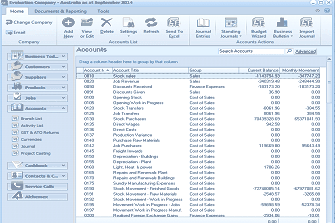
The ABM main screen showing the "Accounts" list view. The left panel displays the folder navigation tree with Business Tools, Customers, Suppliers, Products, Accounts (selected/expanded showing sub-items), GST & ATO Returns, Cashbook, Contacts & CRM, Service Calls, and Addresses. The main area shows a list of ledger accounts in a table with columns including account code, account name, Account Group, Balance, and other financial figures. Visible accounts include Stock Sales, Discounts Received, Cost of Goods Sold, Opening/Work in Progress, Stock Purchases, Job Purchases, Depreciation, Repairs and Renewals, Plant, Vehicle Expenses, Stock Movement, and others with their corresponding balance amounts. The toolbar at the top shows options including Email, Add, New, View or Edit, Delete, Settings, Refresh, Send To Excel, Budgeting, and Scheduled Tasks.
List of existing ledger accounts
-
Click once on the account that you want to delete, in this case 'Lease Interest', and either press the 'Delete' key on your keyboard or select the 'Delete' icon at the top of the screen.
You will see the following prompt: "Are you sure that you want to delete the account record for Lease Interest." If you are sure that this is the job that you want to delete, click 'Yes'. If not, click 'No', and no deletions will have occurred.