Company Menu Bar
Company Menu Bar
The company menu bar is at the top left hand corner of your main viewing area:
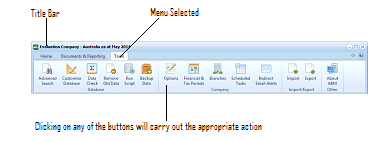
The ABM Company Menu Bar displayed as a ribbon toolbar. The title bar shows "Evaluation Company - Australia as of May 2014". Annotations point out the "Title Bar" on the left and "Menu Selected" in the center. The ribbon contains tabs and buttons including: Advanced, Customise, Data, Restore, Run, Backup, Options, Financial & Tax Periods, Branches, Scheduled, Redirect, Import, Export, and Export Report. Below each button icon are labels. A note at the bottom reads "Clicking on any of the buttons will carry out the appropriate action."
Company Menu Bar
Main Toolbar The main toolbar gives you quick access to commonly used commands in the ABM environment.

The ABM Main Toolbar ribbon. The title bar shows "Evaluation Company - Australia as of May 2014". The ribbon has tabs: Home, Documents & Reporting, and Tools. The Home tab is active and shows the Company section with "Change Company" and "Email" buttons, the Customer List section with buttons for "Add New", "View or Edit", "Settings", "Refresh", "Delete", and "Send To Excel", and additional buttons for Quote, Import, Edit, Delivery, Return, Invoice, and Receipt grouped under "Customer Actions".
Click the Refresh

button to display new or changed data which does not display automatically.
- New: Creates a new record for the selected section.
- Open: Opens the selected record.
- Delete: Deletes the selected record.
- Settings: Select the setting for the appropriate list such as "Show only my Customers", "Hide Inactive Customers".
- Send to Excel: Sends the details of the current columns selected to Excel.