Personalising The ABM Interface
Personalising The ABM Interface
ABM allows you to personalise the appearance of your interface by changing the Background Colour. This will change the appearance, and colour of the screens being used.
To add a Border Colour to the ABM Interface
You can change the colour for each company within ABM. Select Tools\Options\Company. You can then select a colour from the drop down list next to Window Border Colour. Note the border colour will only be selected for the company that you have changed.
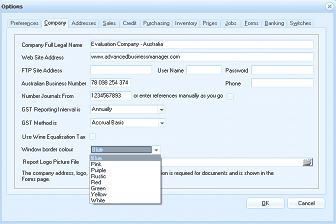
The ABM Options dialog on the Company tab. Fields shown include: Company Full Legal Name ("Evaluation Company - Australia"), Web Site Address ("www.advancedbusinessmanager.com"), FTP Site Address (with User Name and Password fields), Australian Business Number ("78 098 254 374"), Number Journals From ("1234567893" with a note "or enter references manually as you go"), GST Reporting Interval ("Annually" dropdown), GST Methods ("Accrual Basis" dropdown), Use Wine Equalisation Tax (checkbox), and Report Logo Picture File. At the bottom is a "Window border colour" dropdown showing a list of color options including Blue (selected), Pink, Purple, Red, Green, Orange, and White. A note states "The company address, logo... is requested for documents and is shown in the Forms page." OK and Cancel buttons are at the bottom.