Creating a New Company
Creating a New Company
The initial company listed in the Company Database is the Evaluation Company. This section will show you how to create a new company and use this company for trading purposes.
To create a new company:
-
In the main screen, select Change Company.
-
From the Select the Company menu bar, select New, and the New Company Wizard screen will appear:
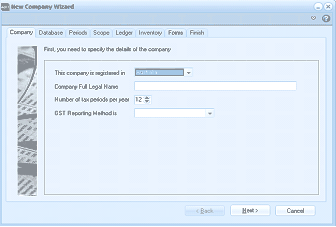
The New Company Wizard dialog window with tabs across the top: Company, Database, Periods, Scope, Ledger, Inventory, Forms, and Finish. The Company tab is currently active and displays the heading "First, you need to specify the details of the company." Below are fields for: "This company is registered in" (a dropdown with a country selected), "Company Full Legal Name" (text input), "Number of tax periods per year" (showing "12" with up/down arrows), and "GST Reporting Method is" (a dropdown). Back, Next, and Cancel buttons are at the bottom.
New Company Wizard
The New Company Wizard contains the following: