Selling Products from a Warehouse Location
Selling Products from a Warehouse Location
When processing a sales delivery or invoice and you have products assigned to Bins, then the appropriate bin will be available to select from when you select the product.
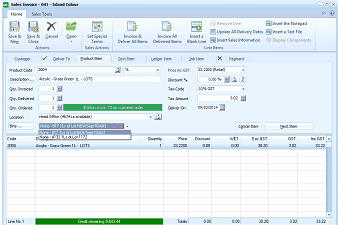
ABM "Sales Invoice - 041 - Solvent Colour" transaction screen. The toolbar shows buttons for Save, Save & Close, Cancel, Set Special Price, Invoice All Delivered Items, Insert a Notepad, Update All Delivery Dates, Insert a Text File, and Show Sales Information. Tabs include Deliver To, Product Item, Text Item, and others. Product entry fields show Product Code (showing "Acrylic - Green Gr. & - LOTS"), Description, Qty. Invoiced, Qty. Delivered, Price, Discount, and GST fields. A Location dropdown is expanded showing available bin locations, including "Head Office (0174 is available)" with sub-locations listed. A tooltip/popup shows "Pick-a-note: Filter on customer side" information. Below is the line items grid showing Code, Description (e.g., "Acrylic - Eisen Green 1L - LOTS"), Quantity, Price, Discount, VET, Exc GST, and Inc GST columns. The credit remaining is shown in the status bar at the bottom.
When you select a product which is assigned to a Bin, then a list of the Bin numbers will be available from the drop-down list for selection. Note: Only the bins where this product is located will be displayed.