Setting up Customer Accounts
Setting up Customer Accounts
To set up a Customer Account: Before setting up a customer account, ensure you have set up the appropriate customer group for the account. See Setting up Customer Groups for details.
After you have checked that a customer not already has an account by checking the customer list, you can create an account for them as follows:
Select Customers in the Folders list (left of screen) and select New on the menu bar (top of screen), and an Add New Customer screen appears:
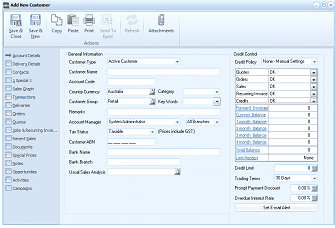
The Add New Customer screen showing the Account Details tab. The left navigation lists sections including Account Details (selected), Selling Details, Addresses, Delivery, Contacts, and others. The toolbar shows Save & Close, Save & New, Copy, Paste, Print, Send To, and Attachments buttons. The main area shows General Information fields: Customer Type (Active Customer), Customer Name (empty), Customer Code (empty), Country Currency (Australia dropdown), Customer Group (Retail dropdown), Account Manager (System Administrator), Tax Taxable checkbox (Prices include GST), Customer ABN, Bank and Branch fields, Usual Sales Analysis. On the right side, Credit Control section shows Credit Policy (None - Manual Settings), fields for Trading Terms (30 Days), Prompt Payment Discount (0.00%), Overdue Interest Rate, and a Set Email Alert button.
Add New Customer
The Add New Customer screen contains: