Deleting a Customer Account
Deleting a Customer Account
WARNING: Deleting a customer account might affect reporting of past performance, since sales made to this customer, while still being retained, will no longer be associated to this customer and will show a description of 'Deleted Account.'
You might want to delete a customer's details from your accounts, for example, if the customer is no longer trading with you.
To delete a Customer Account:
-
Select Customers in the Folders list (left of screen) to bring up a list of existing customers in the main viewing area:
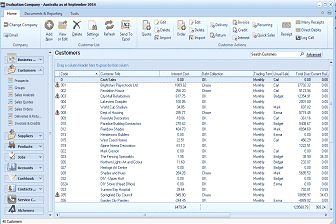 Image Description
The ABM main screen showing the Customers list. The left navigation panel displays folders including Customers (selected), Sales Analysis, Sales Quotes, Delivery & Returns, Suppliers, Products, and others. The main area shows a list of customer accounts with columns for Customer Code, Customer Name, Phone number, Trading Cust, Fax, and balance amounts. Customers listed include Brightstairs Playschools Ltd, Garden City Planters, Lakeview Complex, Rainbow Products, Masaki and Masaki, and others. The toolbar at top includes buttons for Email, Add, View, Quotes, Delete, Settings, Refresh, Send To, and other customer action options. A "Search Customers" bar with an Advanced option is visible.
List of Customer Accounts
-
Click once on the customer to be deleted in order to highlight the name.
-
Press the Delete key on your keyboard or alternatively click 'Delete' at the top of the screen.