Customer Delivery Rules
Customer Delivery Rules
Customer Delivery Rules
You can set up rules that apply to the treatment of orders received from customers.
Select the customer and edit the Delivery Details. There is a drop down list of the delivery requirements.
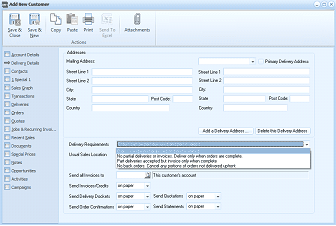
The Add New Customer screen showing the Delivery Details tab. The left navigation lists sections including Account Details, Delivery Details (selected), Addresses, Delivery, Contacts, and others. The toolbar shows Save & Close, Save & New, Copy, Paste, Print, Send To, and Attachments buttons. The main area shows address fields including Mailing Address (Street Line 1, Street Line 2, City, State, Post Code, County, Country) and Primary Delivery Address fields. Buttons for "Add a Delivery Address" and "Delete the Delivery Address" are shown. Below is a "Delivery Requirements" section with a dropdown list showing options for "Usual Sales Location", delivery rules including "No partial deliveries or invoices, Deliver only when orders are complete", and related settings. Checkboxes for "Send all invoices to This customer's account", "Send Invoices", "Send Credits", "Send Delivery Confirmations", "Send Order Confirmations", and "Send Statements" with "on paper" options are shown.
Options
-
Orders can be part delivered and part invoiced.
If the customer is willing to accept deliveries of goods and allow goods that are not in stock now to be placed on back order, then you can select this option.
-
No Partial deliveries or invoices
If the customer stipulates that they will only accept delivery of the order if the order is complete, then select this option. In this case the order can only be delivered/invoiced is sufficient stock is available for all line items on the order.
-
Part deliveries accepted but on invoice when complete:
If the customer is willing to accept partial deliveries of goods, but require that only one invoice is issued covering the total of all deliveries, or the total order, then select this option.
-
No back orders:
If the customer is willing to accept delivery of whatever goods are in stock but will re-order any goods not delivered, then undelivered products or back orders need to be cancelled.