Setting up Supplier Information
Setting up Supplier Information
Setting up Supplier Information
Each supplier can be nominated as a back to back order supplier in two modes.
- A purchase order for the supplier can be generated immediately for the supplier each time a customer places an order for specified products, and those products cannot be supplied from stock.
- Specified products ordered by customers, and not supplied from stock are consolidated into a purchase requisition which can be approved and converted into a purchase order when required.
Select the supplier, and select the Purchasing tab, and select the method by which orders will be placed against this supplier.
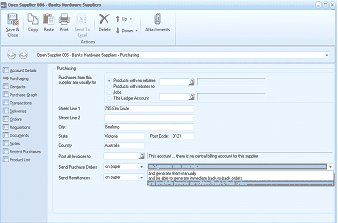
ABM Supplier maintenance screen titled "Open Supplier 006 - Banks Hardware Suppliers" showing the Purchasing tab. The left sidebar shows navigation sections including Account Details, Purchasing, Contacts/Addresses, Transactions, Customer Info, and Product List. The Purchasing tab displays options for "Purchases from this supplier are usually for" with radio buttons for "Products with no relation," "Products with relation to Jobs," and "the Ledger Account" with an account field. Below are address fields (Street 1, Street 2, City showing "Victoria," Country showing "Australia," Post Code showing "7121"). Additional fields include "Post all invoices to" with a note "This account... there is no centralising account for this supplier," and "Send Purchase Orders" with a dropdown showing "on paper." A "Send Remittances" field and "Back to Back" section are visible at the bottom showing options for order processing including "and generate their order auto" and "or able to generate consolidated back-to-back orders."
When the method is selected, you will be asked if you wish to mark all products as available for Back To Back Orders where this is the preferred supplier. This will automatically place a tick in the box for Back to Back Ordering in the products details. Alternatively, this can be done manually be editing the purchase details in the product maintenance screen.
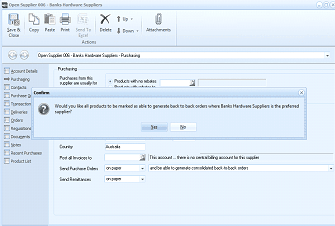
ABM Supplier maintenance screen showing "Open Supplier 006 - Banks Hardware Suppliers - Purchasing" tab with a confirmation dialog box overlaid. The dialog asks: "Would you like all products to be marked as able to generate back to back orders where Banks Hardware Suppliers is the preferred supplier?" with Yes and No buttons. The background shows the same Purchasing tab with supplier details, address fields (City, Country showing "Australia"), and Back to Back order processing settings.