Back to Back Order List
Back to Back Order List
Back to Back Order List
To view a list of the Back to Back Orders sent to suppliers, select the Purchase order list. The orders will be marked with either an orange, or purple flag. Orange flag is for Orders placed for Customers, and Purple is for Overdue Orders placed for Customer.
You will also note that there is also a yellow flag signifying that there is a note attached to the order. This note contains visual details of the customers who have ordered the products on the purchase order.
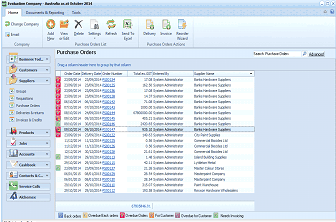
ABM "Purchase Orders" list screen within the Evaluation Company application. The toolbar shows buttons for Change Company, Add, Files, Order, Settings, Refresh, Deliver, and Receive. The left sidebar (Business Trail) shows navigation categories including Suppliers, Customers, Products, and Contacts & CRM. The main content area displays a "Purchase Orders" grid with columns: Order Date, Delivery Date, Order Number, Title (showing "Dept of Housing" and other entries), System Administrator (user), and Supplier Name (showing entries like "Banks Hardware Suppliers" and "Blanks Hardware Suppliers"). Some rows have colored flag icons (orange and purple) indicating Back to Back order status and yellow flags indicating notes attached to orders. Tabs at the bottom include "Back orders," "Overdue/Full edit," "Overdue Order," "Print/Confirm," "Overdue for Customer," and "Needs Invoicing." A "Search Purchase Orders" option and "Advanced" button appear at the top right.
The order can be edited, or delivered from this list if required.