VAT Return
VAT Return
The VAT Return is the equivalent to the Australian Business Activity Statement (BAS). It is a two-page form made up of the VAT Return sheet and the Trading Details Return sheet. It is used as the return for VAT and various other taxes.
To access the VAT Return:
-
Select Accounts in the Folders list, select VAT and a list of existing VAT categories appears:
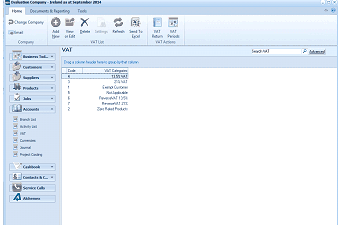
The ABM main application window showing the VAT categories list. The title bar reads "Evaluation Company - Ireland as at September 2014". The toolbar shows Edit, Add, View, Delete, Settings, Refresh, Send To Excel, VAT Return, and VAT Periods buttons. The left navigation panel shows the folder tree with Accounts expanded and VAT selected. The main area displays a "VAT" data grid with a "Search VAT" search bar and "Advanced" button. The grid lists VAT categories with their rates, including: "13.5% VAT", "Exempt Customers", "Irish Customers", "PersonalVAT 23%", "Zero Rated Products", and others.
List of current VAT categories
-
In the VAT Reporting menu bar, select VAT Return:
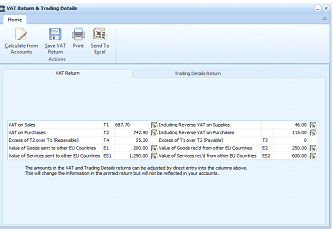
The "VAT Return & Trading Details" screen in ABM. The toolbar at the top shows buttons: Calculate from Accounts, Save VAT Return, Print, and Send To Excel under a "Home" tab. The main area has two tabs: "VAT Return" (currently active) and "Trading Details Return". The VAT Return tab displays a grid with VAT return fields and their values in two columns. The left column shows: VAT on Sales (T1), VAT on Purchases (T2), Excess of T1 over T2/Repayable (T3/T4), and Value of Goods sent to other EU Countries (E1, E2), Value of Services sent to other EU Countries. The right column shows corresponding fields: Inclusive Reverse VAT on Supplies, Including Reverse VAT on Purchases, Excess of T2 over T1 Payable, Value of Goods received from other EU Countries (E2), and Value of Services received from other EU Countries. Monetary values are displayed for each field. A note at the bottom states that amounts in the VAT and Trading Details returns can be adjusted by direct entry, which will change the printed return but will not be reflected in accounts.
VAT Return
The grids show all VAT Returns and Trading Details and their corresponding amounts. ABM automatically calculates the amounts according to the current figures available in the accounts.
You can enter new amounts and percentages in the VAT Return and the Trading Details Return. This will change the information in the printed return but will not be reflected in your accounts.
- Calculate from Accounts: Computes the VAT Returns from the transactions in the current tax period and Trading Details Return from transactions in the current financial year.
- Save VAT Return: Saves the VAT Return to disk but not the Trading Details Return, which needs to be calculated each time. The figures saved will appear in the VAT Return report.
- Print: Prints the VAT and Trading Details Returns.
- Send to Excel: Copies the VAT and Trading Details Returns to Excel for further analysis.