Editing Job Costing Groups
Editing Job Costing Groups
Sometimes it might be necessary to change the details on a group of jobs. For example, you might want to change the percentage mark-up on labour.
To edit a Job Costing Group:
-
Select Jobs in the Folders list (left of screen) and the second level menu appears.
-
Select Groups and a list of existing groups (if any) appears in the main viewing area (right of screen) as below:
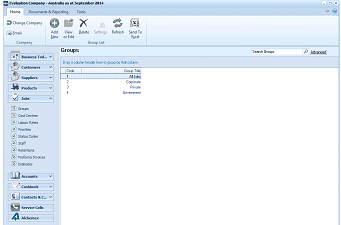
The ABM main application window is shown displaying the "Groups" list view. The left side shows a folder navigation tree with sections including Business Tod..., Customers, Suppliers, Products (expanded to show sub-items: Groups, Cost Centres, Labour Rates, Job Records, Status Codes, Staff, Priorities, Proforma Invoices), Accounts, Cashbook, Contacts & C..., Service Calls, and All Items. The main viewing area on the right displays a "Groups" list with a search bar labeled "Search Groups" and an "Advanced" link. The list shows several job groups with columns for group name and type, including entries such as Corporate, Private, and Government. A toolbar at the top includes standard navigation and action buttons.
List of Job Groups
-
Double-click the group name that you want to edit and the details of that group appears as below:
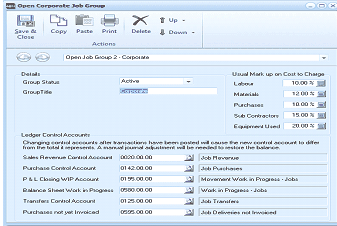
The "Open Corporate Job Group" dialog window is displayed with a toolbar at the top containing Save & Close, Copy, Paste, Print, Delete, Up, and Down buttons under an "Actions" section. Below is a breadcrumb showing "Open Job Group 2 - Corporate". The Details section shows "Group Status" set to "Active" and "Group Title" set to "Corporate". The right side displays "Usual Mark up on Cost to Charge" with fields for Labour (12.00%), Materials (12.00%), Purchases (0.00%), Sub Contractors (15.00%), and Equipment Used (0.00%). The "Ledger Control Accounts" section lists populated account fields including Sales Revenue Control Account (0050.00.00), Purchase Control Account (0195.00.00), P & L Closing WIP Account (0195.00.00), Balance Sheet Work in Progress (0590.00.00), Transfers Control Account (0125.00.00), and Purchases not yet Invoiced (0525.00.00), along with corresponding fields for Job Provisions, Job Purchases, Movement Work in Progress - Jobs, Work in Progress - Jobs, Job Transfers, and Job Deliveries not Invoiced.
Corporate Job Group
-
Edit the details as required (for a breakdown of each field, see Adding Job Costing Groups).
Save Settings To save the settings, select Save and Close at the top of the screen.