Deleting Job Costing Groups
Deleting Job Costing Groups
Sometimes it might be necessary to delete a Job Group.
To delete a Job Costing Group:
-
Select Jobs in the Folders list (left of screen) and the second level menu appears.
-
Select Groups and a list of existing groups appears in the main viewing area (right of screen) as below:
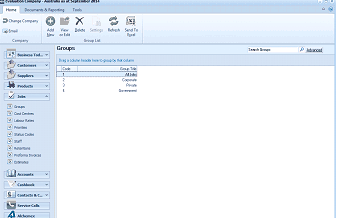
The ABM main application window is shown displaying the "Groups" list view. The left side shows a folder navigation tree with sections including Business Tod..., Customers, Suppliers, Products (expanded to show sub-items: Groups, Cost Centres, Labour Rates, Job Records, Status Codes, Staff, Priorities, Proforma Invoices), Accounts, Cashbook, Contacts & C..., Service Calls, and All Items. The main viewing area on the right displays a "Groups" list with a search bar labeled "Search Groups" and an "Advanced" link. The list shows several job groups with columns for group name and type, including entries such as Corporate, Private, and Government. A toolbar at the top includes standard navigation and action buttons.
List of Job Groups
-
Click once on the group that you want to delete, for example Landscaping Jobs, and either press the Delete key on your keyboard or select the Delete button at the top of the screen.
You will see the following prompt: "Are you sure that you want to delete the job group record for Landscaping Jobs." If you are sure that this is the group that you want to delete, select 'Yes'. If not, select 'No', and no deletions will have occurred.