Introduction
Introduction
ABM allows you to set up various task which can be run at a time and interval that suits you. You can set a report to be produced overnight so that it is printed and ready for your inspection the following morning. The tasks that can be scheduled are as follows.
- Database Housekeeping: You can run a housekeeping procedure which will defrag your indexes and remove any empty space in the database.
- Run a Report: You can schedule the running of any report which can be printed or stored in PDF format to a location of your choice.
- Run a Business Bulletin: You can schedule one of your saved Business Bulletins to run at a time and interval that is convenient to you.
- Run a Data Check: You can schedule a Data Check to run at a specific time, such as overnight, so that it does not hold up normal processing.
To set up a new task select Scheduled Tasks from the Main Menu Bar under Tools. When you select Scheduled Tasks the following screen will appear.
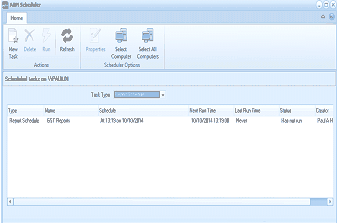
ABM "ABM Scheduler" window. The toolbar shows buttons for New Task, Delete, Run, Refresh, Properties, Select Computer, and Select All Computers under "Scheduled Options." The header shows "Scheduled tasks on: VPAUL88N." Below is a grid with columns: Type (icon), Task Type, Name, Schedule, Next Run Time, Last Run Time, and Enable. One scheduled task entry is visible showing "Repeat Schedule" type, "GST Returns" task name, scheduled "At 1:13 PM on 10/10/2011," with last run time and an "Enable" status of "Paused." The grid area is mostly empty, indicating few scheduled tasks are configured.
This will show all scheduled tasks, including tasks set by other applications, so that you can ensure you do not schedule a task that will conflict with some other task being run at the same time, such as a backup.