Adding Status Codes
Adding Status Codes
Status Codes are used to signify and report on the progress of the job, e.g. 'Quote', 'In Progress', 'Awaiting Inspection', and so on.
To add a new Status Code:
-
Select Jobs in the Folders list (left of screen) and the second level menu appears.
-
Select Status Codes and a list of existing status codes (if any) appears in the main viewing area (right of screen).
-
Select New on the menu bar at the top of the screen and an Add New Status Code screen appears:
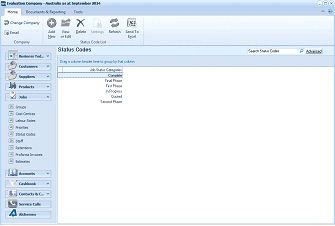
The ABM main application window is shown displaying the "Status Codes" list view. The left side shows a folder navigation tree with sections including Business Tod..., Customers, Suppliers, Products (expanded to show sub-items including Status Codes highlighted). The main viewing area on the right displays a "Status Codes" list with a search bar labeled "Search Status Codes" and an "Advanced" link. The list shows several status code entries including Completed, In Phase 1, In Progress, Quoted, and other status values. A toolbar at the top includes standard navigation and action buttons.
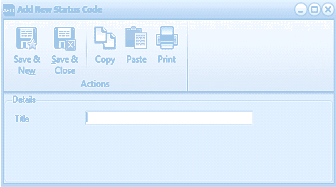
The "Add New Status Code" dialog window is displayed with a toolbar at the top containing Save & New, Save & Close, Copy, Paste, and Print buttons under an "Actions" section. The Details section contains a single "Title" text field where the status code name can be entered. The dialog is compact and simple in layout.
Add New Status Code
Details
-
Title: Enter the status code title here as you would like to see it appear in reports. This field will allow up to 20 characters.
**Save Settings **To save the settings, select Save and Close at the top of the screen.