Adding Priorities
Adding Priorities
Priorities are used to set a criteria as to how critical the job is. Example: 'Urgent', 'Normal' and so on. The Job Priorities tab is used to store the various Job Priority Classifications.
The maximum number of priorities that can be stored is limited only by disk space, or by the maximum capacity of the data table.
To add a Priority Code:
Select the Jobs label in the Folders list (left of screen) and the second level menu appears.
-
Select Priorities and a list of existing priorities (if any) appears in the main viewing area (right of screen).
-
Select **New **on the menu bar at the top of the screen and the screen appears:
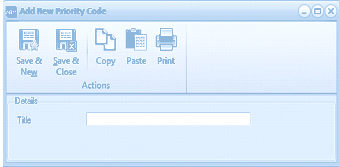
The "Add New Priority Code" dialog window is displayed with a toolbar at the top containing Save & New, Save & Close, Copy, Paste, and Print buttons under an "Actions" section. The Details section contains a single "Title" text field where the priority code name can be entered. The dialog is compact and simple in layout.
Add New Priority Code
Details
-
Title: Enter the priority title here as you would like to see it appear in reports. This field will allow up to 20 characters.
**Save Settings **To save the settings, select Save and Close at the top of the screen.