Editing Labour Rates
Editing Labour Rates
It might be necessary from time to time to change the details on a Labour Rate.
To edit a Labour Rate:
-
Select Jobs in the Folders list (left of screen) and the second level menu appears.
-
Select Labour Rates and a list of existing labour rates (if any) appears in the main viewing area (right of screen).
-
Double-click the labour rate that you want to edit and the details appear as below:
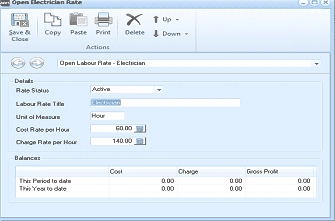
The "Open Electrician Rate" dialog window is displayed with a toolbar at the top containing Save & Close, Copy, Paste, Print, Delete, Up, and Down buttons under an "Actions" section. Below is a breadcrumb showing "Open Labour Rate - Electrician". The Details section contains fields for "Rate Status" (set to "Active"), "Labour Rate Title" (showing "Electrician"), "Unit of Measure" (set to "Hour"), "Cost Rate per Hour" (60.00), and "Charge Rate per Hour" (140.00), each with a calculator button. The Balances section displays a grid with columns for Cost, Charge, and Gross Profit, with rows for "This Period to date" and "This Year to date", all showing values of 0.00.
Open Cabling Rate
-
Edit the details as required (for a breakdown of each field, see Adding Labour Rates).
**Save Settings **To save the settings, select Save and Close at the top of the screen.