Editing Supplier Groups
Editing Supplier Groups
Sometimes it might be necessary to change the details of a Supplier Group. For example, you might want to change the trading terms.
To edit a Supplier Group:
-
Select Suppliers in the Folders list (left of main screen) and the second level menu appears underneath.
-
Select Groups and a list of existing groups appears in the main viewing area (right of screen).
-
Double-click the group name that you want to edit and the details of that group appear as below:
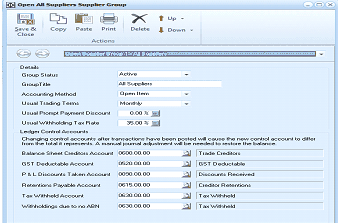
The Open Supplier Group screen in ABM showing the "All Suppliers Supplier Group" details. The toolbar includes buttons for Save & Close, Copy, Paste, Print, Delete, Up, and Down. The Details section shows fields for Group Status (Active dropdown), Group Title, Accounting Method (Open Item dropdown), Usual Trading Terms (Monthly dropdown), Usual Prompt Payment Discount (0.00%), and Usual Withholding Tax Rate. A note warns that changing control accounts after transactions have been posted will cause the new control account to differ from the total it represents, and a manual journal adjustment will be needed to restore the balance. The Ledger Control Accounts section lists fields for Balance Sheet Creditors Account (0600.00.00), GST Deductable Account (0610.00.00), GST Deductable (another field), P & L Discounts Taken Account (0806.00.00), Discounts Received, Retentions Payable Account (0615.00.00), Creditor Retentions, Tax Withheld Account (0520.00.00), Tax Withheld, and Withholdings due to no ABN.
Sub-Contractors Supplier Group
-
Edit the details as required (for a breakdown of each field, see Setting up Supplier Groups).
**Save Settings **To save the settings, select 'Save and Close' at the top of the screen.